

Affiliate Disclosure: This article contains affiliate links to products I personally use and recommend. If you purchase through these links, I earn a small commission at no extra cost to you. This helps support The Cloud Standard and allows me to keep creating in-depth technical content.

⚡ Quick Summary: This guide covers Proton Mail (replaces Gmail), Proton Drive (replaces Google Drive), and Proton VPN + Pass for secure remote access and identity
management.
In 2026, most cloud software licenses grant providers broad rights to process user data. Google Workspace’s Data Processing Amendment offers stronger protections than consumer accounts, but the data processing capabilities remain extensive.
For businesses handling sensitive data, this is a real compliance risk. Your intellectual property, client communications, and strategic planning could be processed in ways you didn’t anticipate or authorize.
If you’re running a business today, you have two choices: accept broad data processing rights in standard terms of service, or migrate to privacy-focused alternatives.
As a cloud infrastructure consultant with over 10 years of experience deploying enterprise cloud solutions, I’ve seen data processing terms expand significantly. In 2026, I migrated my entire business to Proton’s encrypted platform. The transition took a weekend and one anxious Monday morning waiting for DNS to propagate. Worth it. Here’s the complete technical guide to executing this migration.
Table of Contents
- Why business privacy matters more in 2026
- The core: Proton Mail & Calendar
- The vault: Proton Drive & Proton Sheets
- The fortress: Proton VPN & Proton Pass
- Migration guide: 5 steps to switch from Google
- Pricing & verdict
- Frequently asked questions
Why business privacy matters more in 2026
In 2026, business privacy is about protecting your intellectual property from AI model training. Standard cloud terms of service often grant broad licenses for data processing. Switching to a zero-knowledge cloud storage and encrypted email for business ensures your sensitive client data, internal strategy, and proprietary code remain yours — not feedstock for your competitors’ next AI model.
By using standard enterprise suites, you grant broad licenses for your data to be processed, analyzed, and potentially used to train models that compete with you.
The “Pay with Data” model is the default. When you use free or even standard paid tiers of Big Tech products, you are often the product. For a law firm, a health tech startup, or a consultancy, “implied consent” for data processing is a liability.
This is where sovereign cloud and geopatriation come into play. Proton isn’t just “secure email.” It is a Swiss-based platform. Switzerland is key because it sits outside the “14 Eyes” intelligence-sharing agreements (unlike the US and EU). Your data is protected by strict Swiss privacy laws, not US CLOUD Act subpoenas.
While major cloud providers have policies that limit certain uses of business-tier data, the technical infrastructure for broad data analysis exists. For companies in regulated industries or handling sensitive client information, this creates compliance and privacy concerns.
The core: Proton Mail & Calendar (your Gmail alternative)
Proton Mail is an encrypted email for business that uses zero-access architecture, meaning even Proton cannot read your messages. It supports custom domains for professional branding and integrates directly with desktop clients like Outlook and Apple Mail via the Proton Bridge, closing the usability gap with Google Workspace.
→ Try Proton Mail for Business
Gmail’s interface and search capabilities are highly optimized. Proton Mail has significantly improved its user experience over the past two years, closing the functionality gap.
Zero-access architecture explained
The “Zero-Access” architecture is the selling point. When you email another Proton user, the message is a sealed tunnel. When you email a non-Proton user (like a Gmail client), you can password-protect that specific email, forcing them to view it on a secure page. For sending contracts or sensitive credentials, this is invaluable.
Unlike Google Workspace, where Google holds the encryption keys and can technically access your data (even if they claim not to for business accounts), Proton can’t decrypt your content even if court-ordered. The encryption keys exist only on your devices.
Custom domains & branding
Professional email requires a custom domain. Setting up you@yourcompany.com takes about 10 minutes. You
update your DNS records (DKIM, DMARC, SPF) just
like you would for Google Workspace. Once verified, it works exactly the same, but the mail servers are in a
nuclear-hardened bunker in the Swiss Alps.
The “Proton Bridge”
Here’s the thing: webmail isn’t for everyone. If your team lives in Outlook or Apple Mail, you can install the Proton Bridge application. It runs in the background, decrypting mail on the fly so your standard desktop client can read it.
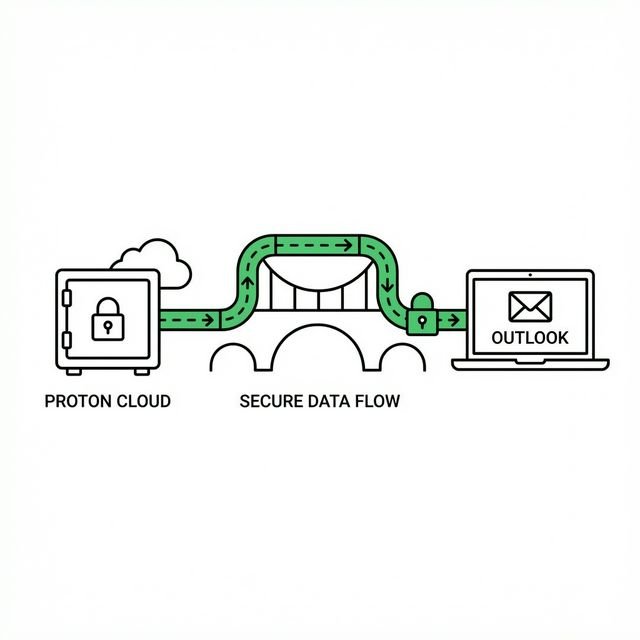
This was a dealbreaker for me initially. I tried webmail-only for a month and hated it. Bridge fixed that. Now I use Apple Mail with full E2EE behind the scenes.
The vault: Proton Drive & Proton Sheets
Proton Drive and Sheets provide zero-knowledge cloud storage and real-time document collaboration. While lacking the deep third-party integrations of Google Workspace, they offer a secure, privacy-first Google Workspace alternative for storing sensitive files and managing spreadsheets without exposing your business data to scanning or data harvesting.
This was the dealbreaker for years. You could have secure email, but you still needed Google Drive for documents. That changed with Proton Drive and the new Sheets.
The interface is clean, fast, and sparse. You get the essentials: real-time collaboration, file versioning, and secure share links. But don’t expect the bloat of Google Workspace. You can’t install a thousand “Add-ons,” and that’s the point.
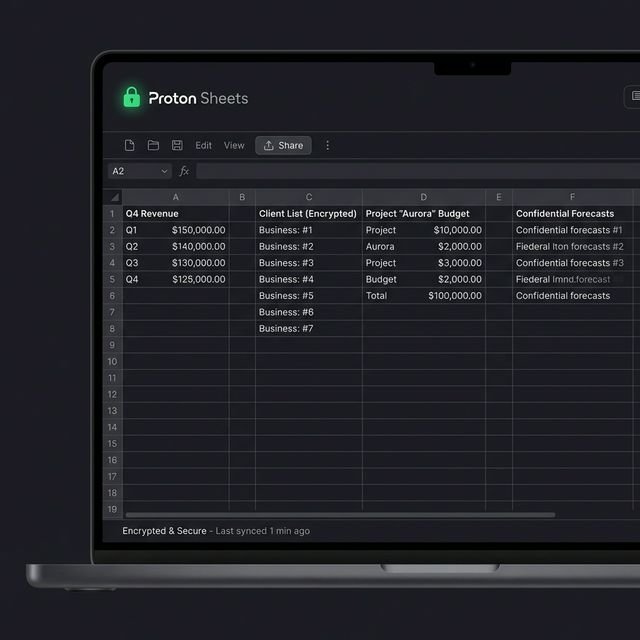
Proton also introduced Lumo, their AI assistant. Unlike Gemini or Copilot, Lumo operates with a privacy-first architecture — it processes requests without storing conversation history or training on user data. After using it for 3 months for email drafting and document summarization, the privacy trade-off justifies the slightly slower response times compared to cloud-based alternatives.
If your team relies heavily on third-party integrations (Zapier workflows, specialized SaaS tools with deep Google Workspace connections), you’ll encounter friction. Proton is building API access, but integration options remain limited compared to Google’s ecosystem.
The fortress: Proton VPN & Proton Pass
Proton VPN and Proton Pass secure your business perimeter. The VPN offers dedicated IPs for controlling access to company resources, while Pass acts as an identity firewall, using “Hide-my-email” aliases to prevent tracking across services and isolate vendor breaches from affecting your primary business credentials.
Securing remote access
For distributed teams, a business VPN is an access control tool, not just a privacy layer. Proton VPN lets you assign dedicated IPs to your team so you can whitelist those IPs in your AWS security groups or admin panels — a simple, effective Zero Trust stepping stone.
If you have a distributed team, you need a VPN. Not for watching Netflix in a different country, but for access control. Proton VPN allows you to assign dedicated IPs to your team. You can then whitelist these IPs in your AWS security groups or WordPress admin panels.
Read more in our guide to Secure Remote Access for DevOps teams.
Identity management with Proton Pass
Proton Pass is the sleeper hit of the suite. It’s not just a password manager; it’s an identity firewall. The “Hide-my-email” feature lets your employees sign up for SaaS tools using unique, forwarded aliases. If one vendor gets breached (and they will), your primary email isn’t exposed.
For a deeper look at legacy planning with password managers, check out our guide on Password Manager Legacy Contacts.
Migration guide: switching from Google in 5 steps
Migrating from Google to Proton typically takes 24-48 hours. The process involves exporting data via Google Takeout, updating DNS MX records to point to Proton, and using the Easy Switch tool to import mail. Critical steps include setting up custom domain authentication (DKIM/DMARC) and provisioning user accounts before flipping the switch.
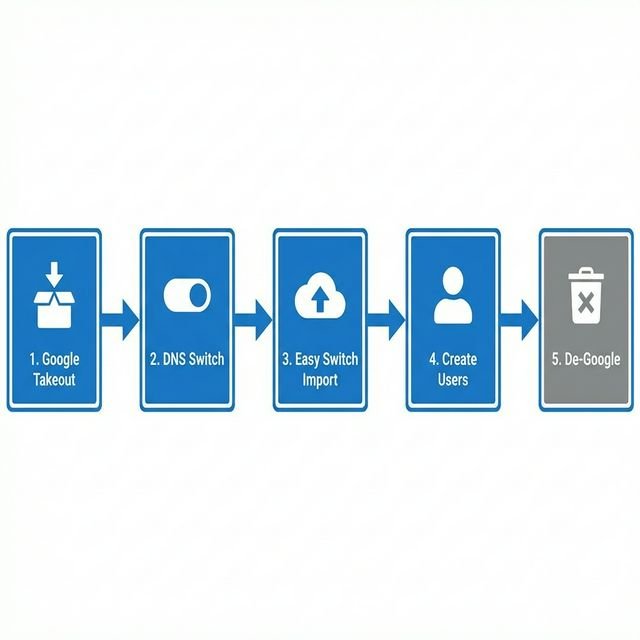
- Export data: Use Google Takeout to grab your MBOX (email) and ICS (calendar) files. Back
them up locally. - DNS switch: Log into your domain registrar (GoDaddy, Namecheap, AWS Route53). Replace your
Google MX records with Proton’s. Note: Email will stop flowing to Gmail immediately. - Import: Use their “Easy Switch” tool. You can actually sign into Google through
Proton to pull data directly, but I prefer the manual file upload for distinct backups. - Onboarding: Create user accounts for your team. Send them their credentials via a secure
secondary channel (like Signal). - De-Googling: Once confirmed working, cancel your Workspace subscription. Enjoy the silence.
The DNS propagation took 36 hours for me. Plan accordingly — don’t do this on a Thursday if you need email working by Monday.
Pricing & verdict: is the Business Suite worth it?
At $12.99/user/month (as of 2026), the Proton Business Suite offers comparable value to Google Workspace Enterprise but with superior privacy protections. It is the ideal choice for regulated industries (healthcare, legal) and privacy-conscious founders, whereas marketing agencies heavily reliant on Google Ads integration may find the ecosystem limitations too restrictive.
| Feature | Google Workspace | Proton Business |
|---|---|---|
| Privacy | Scanning/AI Training | Zero-Access Encryption |
| Jurisdiction | USA (14 Eyes) | Switzerland (Neutral) |
| Collaboration | Excellent (Real-time) | Good (Sheets/Docs) |
| Integrations | Massive Ecosystem | Limited |
| Cost | $6 – $18/user | $12.99/user (2026) |
If you run a heavy ad agency that lives in Google Ads scripts, stay with Google. For everyone else — lawyers, developers, health tech, and privacy advocates — the switch is worth it.
Who should use Proton Business Suite?
Healthcare and legal teams get HIPAA BAA coverage and the strongest possible protection for client communications (see our HIPAA Compliant Hosting guide for the full compliance stack). Journalists and researchers need source protection that survives court orders. Privacy-first agencies can guarantee client data won’t train a competitor’s AI. Developers get IP protection for proprietary code discussed over email.
Our Pick: Proton Business Suite —
At $12.99/user/month, it covers Mail, VPN, Drive, and Pass under Swiss law with zero-access encryption.
For regulated businesses, that’s a reasonable price to keep client data outside US jurisdiction.
30-day money-back guarantee.
Frequently asked questions
Is Proton Mail HIPAA compliant?
Yes. Because Proton itself cannot view your data, it inherently meets many technical safeguards. For the administrative side, the Proton for Business plan allows you to request a Business Associate Agreement (BAA).
Does it work on mobile?
Yes. Proton has dedicated iOS and Android apps for Mail, Calendar, Drive, VPN, and Pass. They are well-designed and support biometric unlock (Face ID).
Can I use Proton with Outlook or Apple Mail?
Yes, via Proton Bridge. It’s a desktop app that runs in the background and decrypts mail for IMAP/SMTP clients like Outlook and Apple Mail.
What happens to my encrypted emails if Proton shuts down?
You can export via IMAP/Bridge. Your data is portable. Proton also provides takeout tools similar to Google Takeout.
How does Proton compare to Google Workspace for teams?
Proton offers superior privacy with zero-access encryption and Swiss jurisdiction. Google offers better integrations and collaboration features. It’s a trade-off: privacy vs ecosystem.
How long does migrating from Google Workspace to Proton take?
The technical migration takes 24-48 hours, but DNS propagation can take up to 36 hours. Plan for a full weekend window. Don’t start on a Thursday if you need email working by Monday.
Can Proton Mail receive emails from Gmail users?
Yes. Proton Mail is fully interoperable with Gmail and any other email provider. Emails from non-Proton users arrive in your inbox normally. End-to-end encryption only applies to Proton-to-Proton messages, unless you use the password-protected email feature for external recipients.