

Affiliate Disclosure: This article contains affiliate links to products I personally use and recommend. If you purchase through these links, I earn a small commission at no extra cost to you. This helps support The Cloud Standard and allows me to keep creating in-depth technical content.
⚡ Quick Summary: Hybrid multi-cloud combines private infrastructure with multiple public clouds
(AWS, Azure, GCP). This guide covers the 4-stage maturity model, 3 production-tested architecture patterns, a
6-phase implementation roadmap, cost management strategies, and real case studies from Spotify and Capital One.
No CTO wants to be the person who bet the company’s entire infrastructure on a single cloud provider. Yet that’s exactly what happened to thousands of companies during the “cloud gold rush” of 2015-2020.
Now, 2026 marks the end of cloud monogamy. According to Flexera’s 2026 State of the Cloud Report, 83% of large enterprises now use multi-cloud strategies (Flexera, 2026) — and that number continues to climb. The question isn’t if you’ll adopt a hybrid multi-cloud strategy, but how well you’ll execute it.
This guide covers proven hybrid multi-cloud architecture patterns for production environments.
Table of Contents
- What is Hybrid Multi-Cloud? (Definitions)
- The 5 Drivers of Multi-Cloud in 2026
- The Multi-Cloud Maturity Model
- Architecture Patterns for Hybrid Multi-Cloud
- The Multi-Cloud Tech Stack
- Implementation Roadmap: 6 Phases
- Cost Management in Multi-Cloud
- Common Pitfalls & How to Avoid Them
- Case Studies
- The Future: Sovereign Clouds & Edge
- Frequently Asked Questions
What is Hybrid Multi-Cloud? (Definitions)
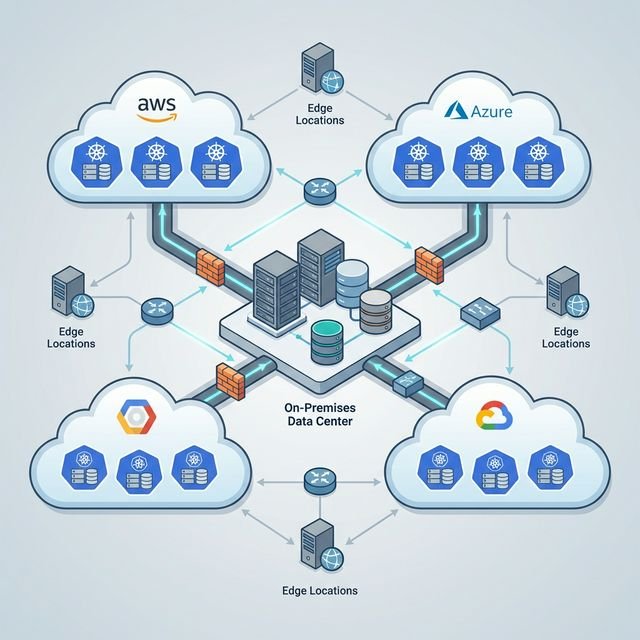
Hybrid multi-cloud architecture combines private infrastructure (on-premises or colocation) with multiple public cloud providers (AWS, Azure, GCP). This approach lets you avoid vendor lock-in while using each provider’s best services where they excel. It’s the full matrix: AWS + Azure + GCP + your own data center + edge locations.
Here’s the breakdown:
- Multi-cloud means using two or more public clouds (AWS + Azure, for example)
- Hybrid cloud means mixing public cloud with private infrastructure (on-prem or colocation)
- Hybrid multi-cloud is both: multiple public clouds + private infrastructure
Organizations now select specific cloud providers based on service strengths rather than choosing a single platform. You’re not abandoning the cloud — you’re being strategic about where each workload lives.
The 5 Drivers of Multi-Cloud in 2026
Enterprises adopt multi-cloud to avoid vendor lock-in, meet regulatory compliance requirements, access best-of-breed services from different providers, ensure disaster recovery across providers, and optimize costs through cloud arbitrage.
Organizations aren’t adopting multi-cloud because it’s trendy. They’re doing it because single-cloud strategies have real, measurable costs.
1. Avoiding Vendor Lock-in
The AWS price hike fear is real. When a single provider controls your entire infrastructure, you have zero negotiating leverage. Multi-cloud gives you options.
But vendor lock-in isn’t just about pricing. It’s about access to proprietary services. If you build your entire application on AWS Lambda, Aurora, and DynamoDB, migrating to another provider means rewriting significant portions of your codebase.
2. Regulatory Compliance
Data residency requirements are getting stricter. GDPR says European customer data must stay in the EU. The DORA (Digital Operational Resilience Act) requires financial institutions to demonstrate multi-provider strategies to avoid concentration risk.
Multi-cloud lets you place workloads in the regions you need without being constrained by which providers have data centers there. Need a presence in Switzerland for banking? You’ve got options beyond the big three.
3. Best-of-Breed Services
Here’s what actually happens in production: AWS is unbeatable for compute variety (EC2 instance types for every use case). GCP’s BigQuery and TensorFlow integration is the best for AI/ML workloads. Azure dominates enterprise integration if you’re a Microsoft shop.
Why pick one when you can use all three where they shine?
4. Disaster Recovery & Resilience
Remember the AWS us-east-1 outage of 2023? Single points of failure exist even at cloud-provider scale. Geographic redundancy across providers means if AWS has a bad day, your application doesn’t.
Spotify runs production workloads on GCP but stores all audio files on AWS S3. If one provider goes down, the music keeps playing.
5. Cost Optimization
Cloud arbitrage is real. Spot instances on AWS, reserved instances on Azure, and sustained-use discounts on GCP all have different pricing models. Smart operators bid workloads to the cheapest provider for that specific compute profile.
And hybrid cloud? That’s where you run steady-state workloads on-prem to avoid paying the “cloud tax” on predictable compute. For more on managing cloud spend strategically, see our guide on FinOps in 2026.
The Multi-Cloud Maturity Model
Multi-cloud adoption progresses through four stages: Accidental (unplanned shadow IT), Strategic Redundancy (DR only), Workload Optimization (intentional placement), and Unified Platform (single pane of glass with seamless workload migration).
Most companies don’t plan multi-cloud — they end up there by accident. Here’s where you probably are:
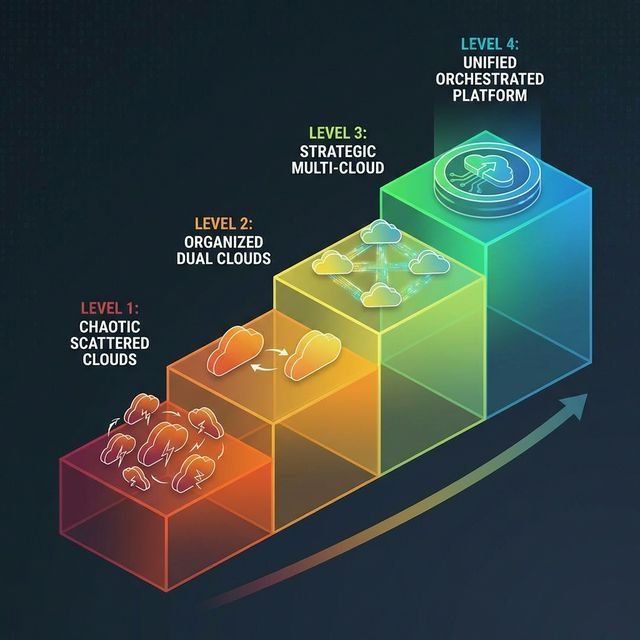
Level 1: Accidental Multi-Cloud (Shadow IT)
Marketing bought a SaaS tool on AWS. Engineering runs
production on GCP. Finance has a data warehouse on Azure. Nobody planned this.
Level 2: Strategic Redundancy (DR only)
You’ve got prod on AWS and a cold DR site on Azure. It’s
multi-cloud on paper, but the secondary provider is barely used.
Level 3: Workload Optimization
Intentional placement: compute-heavy workloads on AWS, AI/ML on
GCP, enterprise integration on Azure. Still managing with separate consoles and tooling.
Level 4: Unified Platform
Single pane of glass management. Kubernetes clusters span multiple
clouds. Workloads migrate automatically based on cost and performance. This is the goal — and it requires serious
infrastructure investment.
Architecture Patterns for Hybrid Multi-Cloud
The three production-tested patterns are: Active-Active (load balancing across multiple clouds simultaneously), Cloud Bursting (on-prem baseline with cloud overflow), and Data Gravity Split (storage in one cloud, compute distributed across others).
Theory is useless without implementation patterns. Here are the three that work in production.
Pattern 1: The “Active-Active” Multi-Cloud
Load balance user traffic across AWS and Azure simultaneously. If one provider experiences an outage or latency spike, traffic automatically routes to the healthy provider.
Use case: Global SaaS applications where uptime is non-negotiable.
Complexity:
High — requires global load balancing (CloudFlare Load Balancer or AWS Global Accelerator) and database replication
across clouds.
Cost: 2x cloud bills unless you’re sharing the load efficiently.
Pattern 2: The “Cloud Bursting” Hybrid
Run baseline workloads on-premises. When demand spikes (Black Friday, end-of-quarter reporting), automatically provision additional capacity in the public cloud.
Use case: Batch processing, seasonal workloads, anything with predictable baseline + variable
peaks.
Complexity: Medium — requires hybrid networking (VPN or Direct Connect) and orchestration
that can span on-prem and cloud. For secure connectivity strategies, see our guide on Secure Remote
Access.
Cost: Optimized — you only pay for cloud when you need it.
Pattern 3: The “Data Gravity” Split
Keep your massive datasets in one cloud (usually the cheapest for storage), but run compute workloads wherever makes sense. AI training on GCP, real-time inference on AWS Lambda, batch analytics on Azure.
Use case: AI/ML pipelines, data warehousing, anything where moving petabytes is
expensive.
Complexity: High — egress fees will destroy your budget if you’re not careful. Plan
data movement carefully.
Cost: Variable — can be cheap if architected well, catastrophic if not.
The Multi-Cloud Tech Stack
Essential tools for multi-cloud management include Kubernetes for orchestration, Terraform for infrastructure as code, Istio or Linkerd for service mesh, Prometheus/Grafana for observability, HashiCorp Vault for secrets, and VPN/ZTNA for secure connectivity.
You can’t manage multi-cloud with five different consoles and a spreadsheet. Here’s the stack that works:
1. Orchestration Layer: Kubernetes
Kubernetes is the universal control plane for multi-cloud. You deploy to AWS EKS, Azure AKS, and GCP GKE using the same YAML manifests. The API is identical.
For cost optimization strategies specific to Kubernetes deployments, check out Kubernetes Cost Optimization: 7 Ways to Cut Your Bill.
2. Infrastructure as Code: Terraform + Pulumi
Terraform is the industry standard for managing cloud resources as code. Pulumi is the modern alternative if you prefer writing infrastructure in TypeScript or Python instead of HCL.
For multi-account AWS management, see Terragrunt for Multi-Account AWS.
3. Service Mesh: Istio + Linkerd
Service meshes handle cross-cloud networking, service discovery, and traffic management. Istio is feature-rich but complex. Linkerd is lightweight and easier to operate.
4. Observability: Prometheus + Grafana + Datadog
You need unified monitoring across all clouds. Prometheus for metrics, Grafana for visualization, Datadog if you want a managed solution that does it all.
5. Secrets Management: HashiCorp Vault
Centralized secrets management is non-negotiable. Vault provides a single source of truth for API keys, database passwords, and certificates across all environments.
6. Security & Connectivity
Cross-cloud connectivity requires secure tunnels and access control. For administrative access to your distributed infrastructure, Proton VPN provides encrypted gateway access with Swiss privacy standards — particularly useful if you’re managing infrastructure across multiple regions and compliance zones.
For production workloads, implement Zero Trust Network Access (ZTNA) with tools like Teleport or Tailscale.
Implementation Roadmap: 6 Phases
Successful multi-cloud implementation follows six phases: Assess (dependency mapping), Pilot (single workload test), Automate (unified CI/CD), Integrate (cross-cloud networking), Optimize (cost and performance tuning), and Govern (policy enforcement and compliance).
Here’s how you actually build this, step by step.
Phase 1: Assess (Current Dependency Mapping)
Map every application, data store, and integration. Identify which workloads are cloud-agnostic and which are tightly coupled to provider-specific services.
Deliverable: Dependency graph showing what can move and what’s locked in.
Phase 2: Pilot (Single Workload to Secondary Cloud)
Pick one non-critical application. Deploy it to a second cloud provider. Learn the networking, IAM, and operational differences before committing everything.
Deliverable: Running application on secondary cloud + runbook documenting lessons learned.
Phase 3: Automate (Unified CI/CD Pipeline)
Build deployment pipelines that work identically across AWS, Azure, and GCP. Use Kubernetes + Terraform to abstract away provider differences.
Deliverable: CI/CD pipeline that deploys to any cloud with a config change.
Phase 4: Integrate (Cross-Cloud Networking)
Set up VPN tunnels or direct connections between clouds. Implement service mesh for cross-cloud service discovery. This is where it gets expensive — egress fees add up fast.
Deliverable: Services on AWS can talk to services on GCP without touching the public internet.
Phase 5: Optimize (Cost and Performance Tuning)
Now that you’ve got workloads on multiple clouds, optimize placement. Move compute-heavy batch jobs to the cheapest provider. Run latency-sensitive APIs closest to users.
Deliverable: 20-30% reduction in cloud spend through strategic workload placement.
Phase 6: Govern (Policy Enforcement and Compliance)
Implement policy-as-code with Open Policy Agent (OPA). Automate compliance checks. Set up cost alerts and budget controls across all providers.
Deliverable: Centralized governance dashboard + automated policy enforcement.
Cost Management in Multi-Cloud
Multi-cloud cost management requires unified billing, tagging standards, and tools like Kubecost, CloudHealth, or Apptio Cloudability. Without visibility and governance, cloud sprawl can double your bill instead of reducing it.
Multi-cloud can save money — or it can double your bill. The difference is management discipline.
The “Cloud Sprawl” problem: When teams can provision resources on three different clouds, cost visibility disappears. You need unified billing and tagging standards.
Tools that work:
- Kubecost for Kubernetes-specific cost allocation
- CloudHealth for cross-cloud cost management
- Apptio Cloudability for enterprise FinOps
For a comprehensive approach to cloud cost optimization, read our FinOps Cloud Cost Management Guide.
Common Pitfalls & How to Avoid Them
The biggest multi-cloud mistakes are data transfer costs (AWS charges $0.09/GB egress), inconsistent security policies across providers, skill gaps requiring multi-platform expertise, and over-engineering when simpler solutions would work.
Data Transfer Costs: The Hidden Killer
Egress fees between clouds can destroy your budget. AWS charges $0.09/GB to send data out. If you’re moving terabytes daily, that’s tens of thousands per month.
Fix: Minimize cross-cloud data movement. Use caching aggressively. Consider dedicated network connections (AWS Direct Connect, Azure ExpressRoute) if volume is high.
Inconsistent Security Policies
AWS IAM, Azure RBAC, and GCP IAM all work differently. Without policy-as-code, your security posture will be inconsistent.
Fix: Implement Open Policy Agent (OPA) to enforce consistent security rules across all clouds.
Skill Gaps
Training teams on three different cloud platforms is expensive. Engineers who know AWS inside-out still need to learn Azure and GCP.
Fix: Use cloud-agnostic tools (Kubernetes, Terraform) to minimize platform-specific knowledge requirements.
Over-Engineering
Not every company needs Level 4 multi-cloud maturity. If you’re running three microservices with 100 users, multi-cloud is overkill.
Fix: Be honest about your scale. Start simple, add complexity only when justified by real business needs.
Case Studies
Real-world examples: Spotify uses GCP for compute and AWS S3 for storage (leveraging best-of-breed services), while Capital One moved to AWS but is now building private GPU infrastructure for AI workloads (hybrid economics delivering better ROI).
Spotify: Multi-Cloud for Global Reach
Spotify migrated nearly all backend workloads to GCP in 2016, but kept AWS S3 for audio file storage and CloudFront for content delivery. The result? They use GCP’s superior data analytics (BigQuery) and machine learning tools while using AWS for what it does best: cheap, reliable object storage.
Outcome: Faster innovation cycles, better ML-driven recommendations, and 99.99% uptime despite running on two providers.
Capital One: Hybrid for Compliance
Capital One went “all-in” on AWS public cloud in 2020, exiting all on-premises data centers. But in 2025, they began exploring hybrid approaches specifically for AI workloads due to rising GPU costs. They’re reportedly building “AI factories” — private data centers with GPU capability — while keeping core banking applications on AWS (reported by The Wall Street Journal, 2025).
Lesson: Even “cloud-first” companies return to hybrid when economics demand it.
The Future: Sovereign Clouds & Edge
Multi-cloud is evolving beyond the “Big Three.” Sovereign cloud providers — national or regional clouds that comply with local data laws — are growing fast. Switzerland’s SwissCloud, Germany’s Gaia-X, and France’s OVHcloud all offer alternatives to AWS/Azure/GCP for enterprises with strict data sovereignty requirements.
For more on this trend, see our article on Sovereign Cloud & Geopatriation.
Edge computing adds another layer. Your hybrid multi-cloud might soon include AWS + Azure + your data center + 50 edge locations running lightweight Kubernetes clusters. The architecture principles remain the same — workload placement based on latency, cost, and compliance.
The Bottom Line: Multi-Cloud is a Journey
Multi-cloud architecture isn’t a finish line — it’s a continuous optimization process. Start simple: pick one workload, move it to a secondary provider, and learn the operational differences. Build automation. Implement unified monitoring. Only then scale to full multi-cloud operations.
The companies that succeed with multi-cloud are the ones that treat it as an engineering discipline, not a checkbox on a compliance form.
What is the difference between multi-cloud and hybrid cloud?
Multi-cloud means using two or more public cloud providers (AWS + Azure, for example). Hybrid cloud means combining public cloud with private infrastructure (on-premises or colocation facilities). Hybrid multi-cloud combines both: multiple public clouds plus private infrastructure.
Is multi-cloud more expensive than single-cloud?
It depends on execution. Without proper cost management, multi-cloud can double your bill due to data transfer fees and operational overhead. With strategic workload placement and FinOps discipline, multi-cloud can reduce costs by 20-30% through cloud arbitrage and avoiding vendor lock-in pricing.
Do I need Kubernetes for multi-cloud?
Not strictly required, but Kubernetes is the most practical way to achieve true workload portability across clouds. Without an abstraction layer like Kubernetes, you’ll need to manage cloud-specific deployment processes for AWS, Azure, and GCP separately.
How do I avoid data transfer costs in multi-cloud?
Minimize cross-cloud data movement by carefully planning workload placement. Use caching layers, implement edge caching with CDNs, and consider dedicated network connections (AWS Direct Connect, Azure ExpressRoute) if you’re moving large volumes regularly. The cheapest multi-cloud architectures keep data movement within the same provider.
What’s the biggest risk of multi-cloud?
Complexity. Managing three different cloud consoles, IAM systems, and billing models creates operational overhead. Without strong automation (Infrastructure as Code, unified monitoring), multi-cloud becomes unmanageable. Start with proven patterns and build complexity incrementally.