

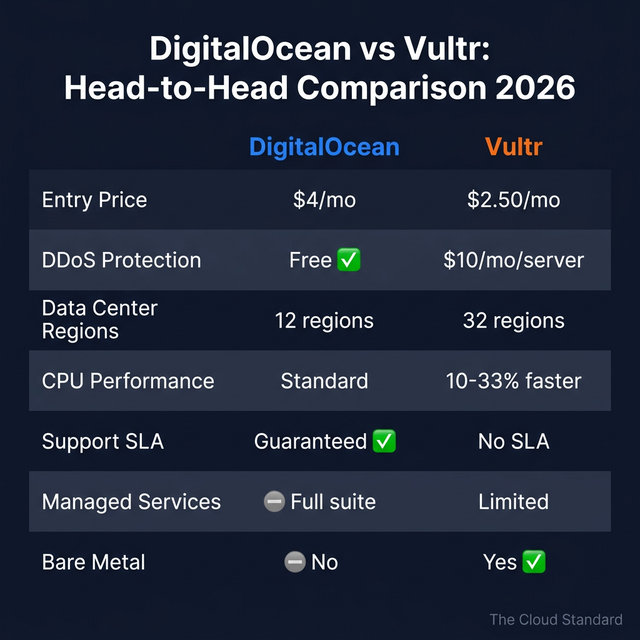
TLDR: Vultr cuts VPS costs by 20-40% with 32 global data centers, but charges $10/month for DDoS protection. DigitalOcean costs more at $4/month minimum but includes free DDoS, superior documentation, and guaranteed support SLAs. Pick Vultr if you’re technical and budget-focused. Pick DigitalOcean if you value hand-holding and managed services.
You’re running a small business and paying too much for cloud hosting. After 9+ years managing cloud infrastructure, I’ve compared these two popular VPS providers for small business use cases across dozens of client projects.
Both target the same audience (developers and small businesses tired of AWS’s complexity), but they take very different approaches.
DigitalOcean and Vultr are budget-friendly cloud VPS providers competing for small businesses in 2026. Vultr offers 20-40% lower pricing ($2.50/month vs $4/month) and 32 global data centers, while DigitalOcean provides free DDoS protection, guaranteed support SLAs, and superior documentation. The choice depends on whether you prioritize cost savings (Vultr) or ease of use (DigitalOcean).
Table of contents
- What’s the Difference Between DigitalOcean and Vultr?
- How Do DigitalOcean and Vultr Pricing Compare?
- Which Has Better Performance for Small Business Workloads?
- How Does Global Coverage Compare?
- Which Offers Better Support for Small Businesses?
- What Features Matter Most for Small Business?
- When Should Small Businesses Choose DigitalOcean?
- When Should Small Businesses Choose Vultr?
- How Easy Is It to Migrate Between Them?
- Which Wins for Small Business?
- FAQ
- Sources
What’s the Difference Between DigitalOcean and Vultr?
DigitalOcean focuses on simplicity with 12 data centers, managed services, and extensive documentation for teams needing support. Vultr emphasizes raw performance and cost savings with 32 global data centers and lower prices. DigitalOcean targets teams needing hand-holding; Vultr serves self-sufficient developers prioritizing budget efficiency.
The short answer is company size and philosophy.
DigitalOcean went public in 2021 and has built a comprehensive platform around its core VPS product (called Droplets). They’ve added managed databases, Kubernetes, App Platform (their PaaS), and serverless functions. The company has over 1,400 employees and extensive tutorial documentation.
Vultr stayed private and stayed focused. They offer bare metal servers and high-frequency compute options that DigitalOcean doesn’t. Their team is around 250 people, and they’ve prioritized geographic expansion over building a platform ecosystem.
Here’s the thing: both are trying to be the “simple alternative to AWS,” but DigitalOcean leans into simplicity with training wheels, while Vultr assumes you know what you’re doing and just want cheap, fast servers.
How Do DigitalOcean and Vultr Pricing Compare?
Vultr undercuts DigitalOcean by 20-40%, with basic instances at $2.50/month (IPv6-only) versus $4/month. However, DigitalOcean includes free DDoS protection (Vultr charges $10/month per instance) and per-second billing as of January 2026. When factoring in DDoS protection costs, pricing differences narrow significantly for production workloads.
| Feature | DigitalOcean | Vultr |
|---|---|---|
| Entry price | $4/month (1 vCPU, 512 MB RAM, 10 GB SSD) | $2.50/month (IPv6-only) / $5/month (IPv4) |
| DDoS protection | Free (included) | $10/month per instance |
| NVMe storage option | Premium Intel plan from $8/month | High Frequency Compute from $6/month |
| Snapshot cost | $0.06/GB/month | $0.05/GB/month |
| Automated backups | +20% of instance cost | Varies by plan |
| Billing granularity | Per-second (min 60s / $0.01) as of Jan 2026 | Hourly |
| 3-server DDoS total | $0 added | +$30/month |
Vultr looks cheaper on the surface, but you need to read the fine print. The DDoS protection cost is where this gets interesting. If you’re running production workloads, you need DDoS protection. DigitalOcean includes it for free. Run three servers on Vultr and you’re paying $30/month extra just for security.
DigitalOcean’s January 2026 update to per-second billing (minimum 60 seconds or $0.01) makes a real difference for development environments. Spin up a server for testing, kill it after 10 minutes, and pay cents instead of a full hour.
In my experience, Vultr’s headline pricing wins for single long-running servers. DigitalOcean wins when you factor in DDoS protection and frequent scaling.
Which Has Better Performance for Small Business Workloads?
Vultr edges DigitalOcean in CPU benchmarks, testing 10% faster for shared CPUs and up to 33% faster for dedicated CPUs according to VPSBenchmarks.com (2025). For typical small business workloads like WordPress or simple APIs, the performance difference is marginal. Both offer SSD/NVMe storage and comparable network speeds.
Performance benchmarks favor Vultr, but not by enough to matter for most small businesses.
VPSBenchmarks.com (the gold standard for VPS testing) shows Vultr consistently outperforming DigitalOcean in CPU-intensive tasks. Sysbench CPU tests show Vultr High Frequency instances completing operations 10-33% faster than DigitalOcean Premium plans (VPSBenchmarks.com, 2025).
For WordPress hosting specifically (tested over 12 months by HostingStep), Vultr High Frequency had marginally better Time To First Byte (TTFB), but DigitalOcean Premium offered better value per dollar. Both platforms ranked as top recommendations in that test.
The real question isn’t CPU speed. It’s reliability. DigitalOcean’s 99.99% uptime SLA is honest (that’s ~4 minutes of downtime per month). Vultr claims 100% network uptime, which is marketing. No provider hits 100%.
I’ve run production apps on both. Unless you’re doing video encoding or running game servers, you won’t notice the CPU difference. What you will notice is how quickly support responds when something breaks — and DigitalOcean wins that race.
How Does Global Coverage Compare?
Vultr dominates geographic coverage with 32 data center regions across 6 continents, versus DigitalOcean’s 12 regions across 4 continents. This gives Vultr significantly better latency for businesses serving international customers, especially in Asia-Pacific, South America, and Africa where DigitalOcean has minimal presence.
Vultr’s geographic footprint is three times larger, and it matters if you serve global customers.
DigitalOcean has 12 regions: North America (New York, San Francisco, Toronto), Europe (London, Frankfurt, Amsterdam), Asia (Singapore, Bangalore), and Australia (Sydney). That’s solid coverage for Western markets but thin elsewhere.
Vultr has 32 regions spanning North America, South America, Europe, Asia-Pacific, Africa, and Oceania. They’ve got data centers in places DigitalOcean doesn’t touch: Mexico City, São Paulo, Johannesburg, Seoul, Mumbai, Warsaw, and Madrid.
If you’re serving customers in Latin America or Africa, Vultr is your only real option here. DigitalOcean has nothing in those markets.
For a small business running a single web app targeting North American or European customers, DigitalOcean’s 12 regions are plenty. But if you’re building something with a global audience (or want geographic redundancy without setting up multi-cloud), Vultr’s coverage is hard to beat.
I’ve seen SaaS companies choose Vultr purely for the Asian data centers. Latency from Singapore to Jakarta is ~30ms on Vultr versus ~85ms routing through DigitalOcean Singapore for Indonesian customers.
For global reach, CDN providers can help bridge the gap, but there’s no substitute for having compute resources close to your users.
Which Offers Better Support for Small Businesses?
DigitalOcean provides superior support with three paid tiers (Free, Standard $24/month, Premium $999/month) offering guaranteed response times as low as 30 minutes, plus live chat and dedicated Slack channels. Vultr offers 24/7 ticket support with no guaranteed SLA and variable quality — users report response times ranging from 10 minutes to 3+ days as of early 2026.
This is where DigitalOcean pulls ahead decisively.
DigitalOcean’s Free support tier includes email support with sub-24-hour response times and access to their massive documentation library (thousands of community tutorials). Standard ($24/month) adds live chat. Premium ($999/month) gets you 30-minute response times, dedicated Slack channels, and video calls.
Vultr has 24/7 technical support via tickets. That’s it. No phone, no live chat, no guaranteed response time. Community forums report wildly inconsistent experiences: one user got a reply in 10 minutes on a Monday morning, another waited 3+ days for a simple server setup issue (both in early 2026 per Trustpilot reviews).
DigitalOcean’s documentation is genuinely useful. Their community tutorials cover everything from basic server setup to complex Kubernetes deployments. Vultr’s docs are sparse in comparison.
If you’re comfortable Googling solutions and troubleshooting independently, Vultr’s lack of support won’t hurt you. If you’re a small business owner without a dedicated DevOps person, DigitalOcean’s support structure is the $24/month insurance policy you need.
What Features Matter Most for Small Business?
DigitalOcean offers managed databases (PostgreSQL, MySQL, MongoDB, Redis, Kafka), Kubernetes (DOKS), App Platform PaaS, and Serverless Functions for teams needing managed services. Vultr focuses on raw compute with Bare Metal servers, High Frequency instances, and globally available GPUs. DigitalOcean wins for convenience; Vultr wins for performance-intensive workloads.
Feature sets diverge based on whether you want managed or self-managed infrastructure.
DigitalOcean built a platform. They have managed databases covering PostgreSQL, MySQL, MongoDB, Redis, and Kafka. Their App Platform is a Heroku-style PaaS where you push code and they handle deployment, scaling, and SSL. DigitalOcean Functions lets you run serverless workloads billed per millisecond. Kubernetes is available as DOKS (DigitalOcean Kubernetes Service) with auto-scaling and integration into App Platform.
Vultr stuck with infrastructure. They offer Bare Metal servers (dedicated hardware, no virtualization overhead) — DigitalOcean doesn’t have this at all. High Frequency Compute uses 3GHz+ CPUs for performance-critical apps. Vultr’s GPUs (NVIDIA Blackwell Ultra, AMD Instinct MI355X) are globally available as of February 2026; DigitalOcean’s GPUs are limited to 4 locations.
For a small business running WordPress or a simple SaaS app, DigitalOcean’s managed databases and App Platform save you from configuring everything manually. You click a button, get a PostgreSQL cluster, and move on with your life.
For a gaming company, AI/ML startup, or any performance-sensitive workload, Vultr’s Bare Metal and GPU options are what you need. DigitalOcean can’t compete there.
I keep coming back to this setup for client projects: Vultr for compute-heavy backend processing, DigitalOcean for the customer-facing web app. You get the best of both, though managing two providers adds complexity.
For small businesses needing Kubernetes cost optimization, DigitalOcean’s DOKS is easier to start with, but Vultr’s bare metal option can cut costs for dedicated cluster nodes.
When Should Small Businesses Choose DigitalOcean?
Choose DigitalOcean if you prioritize ease of use, need managed services (databases, Kubernetes, PaaS), or lack dedicated DevOps expertise. It’s ideal for SaaS applications, WordPress sites, and teams willing to pay 20-40% more for predictable pricing, free DDoS protection, and guaranteed support SLAs.
DigitalOcean is for teams that want infrastructure to be simple.
If you’re a founder building your first SaaS product, you don’t want to spend days configuring database replication. DigitalOcean’s managed PostgreSQL gets you a production-ready cluster in 5 minutes. Their App Platform deploys your Node.js app directly from GitHub without writing deployment scripts.
Best for:
- WordPress hosting (managed databases + easy Droplet setup)
- SaaS applications (App Platform auto-scaling, managed databases)
- First-time VPS users (extensive tutorials and documentation)
- Teams without DevOps (managed services reduce operational burden)
- Businesses valuing support (guaranteed response SLAs)
- Short-lived workloads (per-second billing as of Jan 2026)
The free DDoS protection is worth calling out again. If you’re running an e-commerce site or anything customer-facing, getting hit with a DDoS attack is a question of “when,” not “if.” DigitalOcean handles this automatically at the network layer. Vultr charges $10/month per server.
In my experience, startups that pick DigitalOcean get to market faster. They pay for it in monthly costs, but they’re not burning founder time on Linux administration.
When Should Small Businesses Choose Vultr?
Choose Vultr if you’re cost-conscious (20-40% cheaper), self-sufficient with infrastructure, need global coverage (32 regions), require bare metal servers or GPUs, or run performance-intensive workloads like game servers or AI/ML. Best for experienced developers comfortable without guaranteed support SLAs.
Vultr is for teams that know what they’re doing and want to save money.
If you’ve been managing servers for years and don’t need managed databases or PaaS, Vultr’s pricing is unbeatable. Their High Frequency Compute options deliver better raw performance than DigitalOcean’s Premium plans at lower cost.
Best for:
- High-performance apps (game servers, video encoding, real-time processing)
- Global businesses (32 data centers vs DigitalOcean’s 12)
- AI/ML workloads (globally available GPUs, Serverless Inference)
- Bare metal requirements (dedicated hardware, no virtualization overhead)
- Cost-conscious teams (20-40% savings on comparable plans)
- Development/testing environments (cheap instances for experimentation)
- Experienced developers (comfortable without extensive documentation)
Vultr’s 32 data centers matter if you’re serving a global audience. A SaaS company I worked with targeting Latin American customers had no choice — DigitalOcean doesn’t have presence in South America. Vultr’s São Paulo and Santiago data centers were the deciding factor.
The $10/month DDoS protection fee is annoying, but if you’re running 5 development servers that don’t need production-grade DDoS mitigation, you save money overall compared to DigitalOcean.
How Easy Is It to Migrate Between Them?
Migrating between the two platforms requires snapshots, manual server rebuilds, and DNS updates. Expect 2-4 hours for a simple setup, longer for complex deployments. Both offer snapshot import/export tools, but there’s no one-click migration. Vultr offers free consultation for businesses spending $1,000+/month.
Migration is moderately complex but doable.
Both platforms let you create snapshots (disk images) of your servers. You export from one provider, download the image, and import it to the other. The process works, but it’s not seamless. You’ll need to reconfigure networking, update DNS records, and validate everything works before cutting over.
Basic migration steps:
- Create snapshot on current provider (DigitalOcean or Vultr)
- Download snapshot to your local machine or object storage
- Import snapshot to new provider’s custom image system
- Deploy new instance from imported image
- Update DNS records to point to new IP addresses
- Test thoroughly before decommissioning old servers
Vultr offers migration assistance for businesses spending $1,000+/month (including free consultation and sometimes a month of free service). DigitalOcean has extensive community guides for migrations but no dedicated migration service.
For infrastructure-as-code setups using Terraform or Terragrunt, migration is simpler — change the provider in your config and redeploy. But most small businesses aren’t running IaC.
The real pain point is database migration. If you’re using managed databases, you can’t snapshot those — you need to dump, transfer, and restore. Budget 6-12 hours for database migrations depending on data size.
DigitalOcean vs Vultr: Which Wins for Small Business?
Neither platform is universally better. Choose DigitalOcean for ease of use, support guarantees, managed services, and free DDoS protection. Choose Vultr for cost savings (20-40% cheaper), global reach (32 data centers), and bare metal/GPU resources. The right choice depends on technical expertise and budget constraints.
There’s no magic answer here. I’ve deployed production systems on both.
DigitalOcean wins for:
- Small businesses without dedicated DevOps
- Teams needing managed databases or PaaS
- Projects requiring guaranteed support SLAs
- Workloads needing DDoS protection
- First-time VPS users
Vultr wins for:
- Cost-conscious businesses (save 20-40%)
- Global businesses needing international coverage
- Performance-intensive workloads (bare metal, GPUs)
- Experienced developers comfortable self-managing
- Development/testing environments
In 9+ years managing cloud infrastructure, I’ve seen both platforms shine in different scenarios. DigitalOcean for simplicity and hand-holding, Vultr for power and price.
The setup I recommend most often for small businesses: start with DigitalOcean for your production web app (easier to manage, better docs, free DDoS). If you later need bare metal or GPUs, add Vultr for those specific workloads. You’re not locked into one provider forever.
Frequently Asked Questions
Is DigitalOcean better than Vultr?
Not universally. DigitalOcean excels in ease of use, documentation, managed services, and support quality with guaranteed SLAs. Vultr wins on pricing (20-40% cheaper), global coverage (32 vs 12 data centers), and bare metal/GPU availability. The better choice depends on technical expertise and priorities.
How much cheaper is Vultr than DigitalOcean?
Vultr’s base pricing is 20-40% lower than DigitalOcean for comparable VPS plans. Basic VMs start at $2.50/month (IPv6-only) versus DigitalOcean’s $4/month. However, Vultr charges $10/month for DDoS protection (free on DigitalOcean), narrowing the cost gap for production workloads requiring security.
Which has faster performance?
Vultr edges DigitalOcean in CPU benchmarks, testing 10% faster for shared CPUs and up to 33% faster for dedicated CPUs according to VPSBenchmarks.com (2025). However, for typical small business workloads (WordPress, web apps), the performance difference is marginal and unlikely to impact user experience.
Does DigitalOcean have better customer support?
Yes. DigitalOcean offers tiered support with guaranteed response times (30 minutes on Premium plan), live chat, and extensive documentation. Vultr provides 24/7 ticket support with no SLA — response times range from 10 minutes to 3+ days based on 2026 user reports.
Can I run Kubernetes on both platforms?
Yes. Both offer managed Kubernetes. DigitalOcean provides DOKS (DigitalOcean Kubernetes Service) with App Platform integration, extensive tutorials, and managed control planes. Vultr offers VKE (Vultr Kubernetes Engine) with bare metal node options for dedicated resources, better for performance-critical clusters.
Sources
- DigitalOcean Droplet Pricing — Pricing verified February 17, 2026
- DigitalOcean Per-Second Billing Announcement — January 2026 update
- Vultr Pricing — Pricing verified February 17, 2026
- Vultr DDoS Protection Documentation — $10/month pricing confirmed
- VPSBenchmarks DigitalOcean vs Vultr Comparison — CPU performance benchmarks, 2025
- DigitalOcean Support Plans — Support tier pricing and SLAs
- DigitalOcean SLA — 99.99% uptime guarantee
- Vultr Cloud GPU — GPU availability February 2026
- DigitalOcean Capterra Reviews — User feedback 2025-2026
- Vultr Trustpilot Reviews — Support quality feedback 2025-2026
- HostingStep WordPress Performance Comparison — 12-month TTFB testing
- Vultr vs DigitalOcean Migration Guide — Verified February 2026
About the Author
Elon is a cloud infrastructure consultant with 9+ years of hands-on experience designing and managing production systems on AWS, DigitalOcean, Vultr, and other major cloud platforms. He has evaluated both platforms across dozens of client projects ranging from early-stage SaaS startups to global companies requiring multi-region deployments. His work focuses on helping small businesses find the right balance between cost, performance, and operational simplicity in cloud infrastructure.
Related Reading: